20 lens profiles
Explore independently authored creative approximations of classic lens character, with controls for bokeh, bloom, softness, fringing and vignette.

A little character. A whole new feeling.
Bring lens character, film texture and expressive captions into one native Mac workspace. Aftergrain Pro includes Aftergrain 2.2.
Coming 27 November 2026

Open an image or a video. Explore a lens profile, dial in its strength, then shape the grain, color and glow. Compare the result with the original or use a split view as you refine your look.
Explore independently authored creative approximations of classic lens character, with controls for bokeh, bloom, softness, fringing and vignette.
Start with tonal response, color bias, halation and procedural grain. Import supported 3D .cube LUTs for another way to shape the image.
Choose from 15 caption styles, refine type and color, and reveal words with their timings. Export a separate portrait Reel alongside your main video.
A closer look at the tools, controls and workflows included in Aftergrain 2.2.
01 / LENS CHARACTER
Start with a profile, then make the character your own. Twenty independently authored looks bring vintage and cinema references into the same workspace.
Searchable lens collection. Explore Noctilux, Summilux, Summicron, APO-Summicron, Elmarit, Nokton, Helios, Cooke Panchro, Canon, Petzval and Super Takumar references. Original resets the lens stage.
Bokeh, shaped by you. Adjust defocus, highlight definition, swirl, cat-eye shape, aperture stops and the transition near your subject. Protect People uses a person mask, and Clean Subject Edges refines the boundary.
Character in the corners. Control bloom, coma, fringing and vignette, then open Fine Detail for aberration, edge softness, color cast and lens distortion.
Optics compensation. Change field of view, reverse the mapping, fill the frame automatically and shift the optical center horizontally or vertically.
Creative interpretations. These profiles are not measured reproductions of physical lenses. They do not recover scene depth, reverse existing blur or recreate hidden detail. Manufacturer references imply no endorsement.
02 / FILM & COLOR
Tone, texture and color work together. Begin with an original film look, dial in the grain, then finish with your own grade.
Seven starting points. Daylight 35, Tungsten 500, Pastel 400, Chrome 100, Silver 400, Soft 16 and Bleach Silver combine tone, saturation, color bias, lifted blacks, halation and grain.
Grain that stays put while you edit. Adjust grain amount and size. Procedural grain is stable at a given frame time. You can also select a custom grain video, with speed and blending controls.
Your LUT, your balance. Import normalized 3D .cube LUTs from size 2 to 64 and adjust their amount. Keep the original LUT file available. 1D, custom-domain and combined shaper LUTs are not supported.
Color & Look. Choose a grading look and its strength, then adjust exposure, contrast, saturation, warmth and tint.
Subject & Mask. Refine edge softness and mask stability, sharpen the subject or inspect the mask. Retouch controls cover skin smoothing, texture, even tone, teeth and eyes.
Save your signature. Save the current look as a named preset and apply it again. Reset a slider by double-clicking its label, or reset all adjustments.
03 / CAPTIONS & VOICE
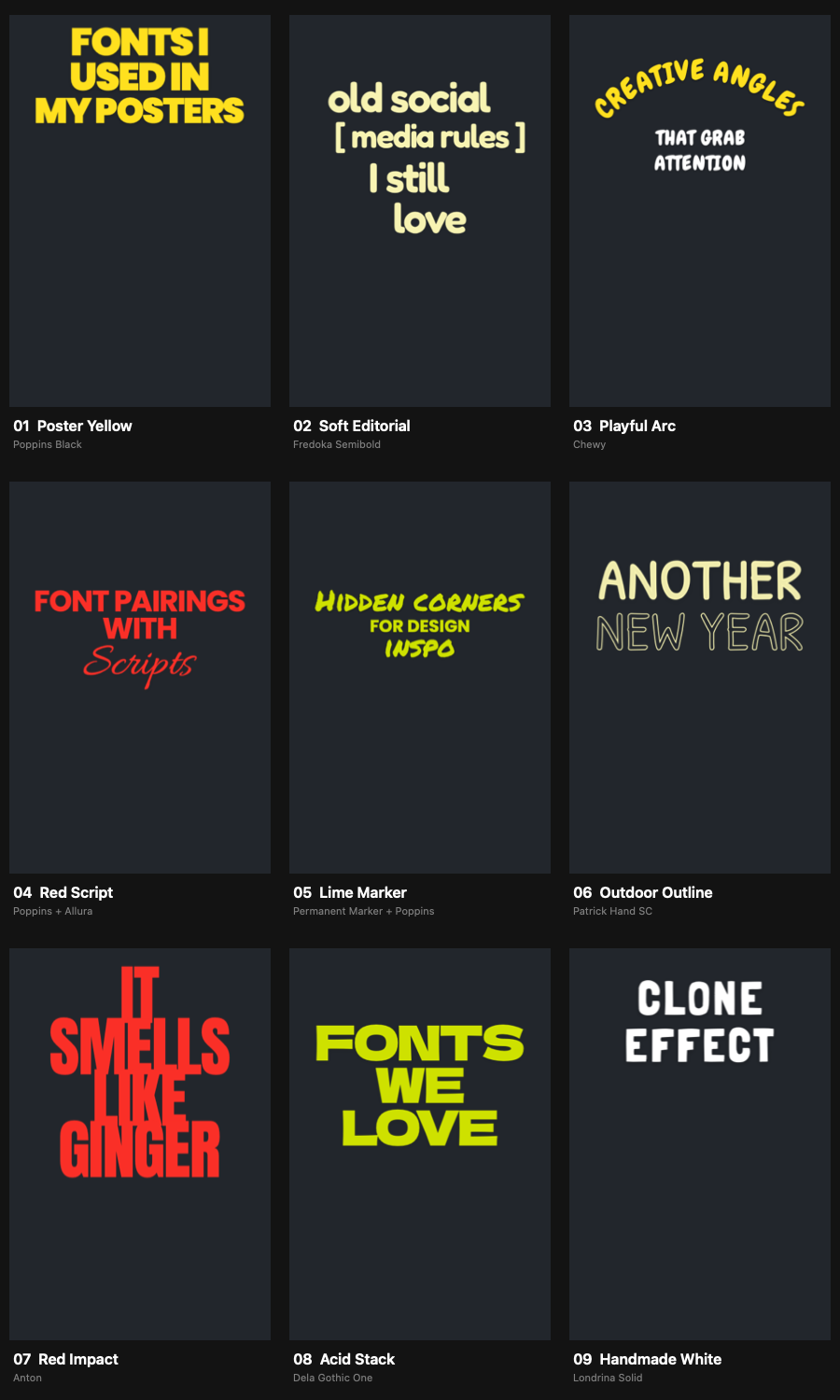
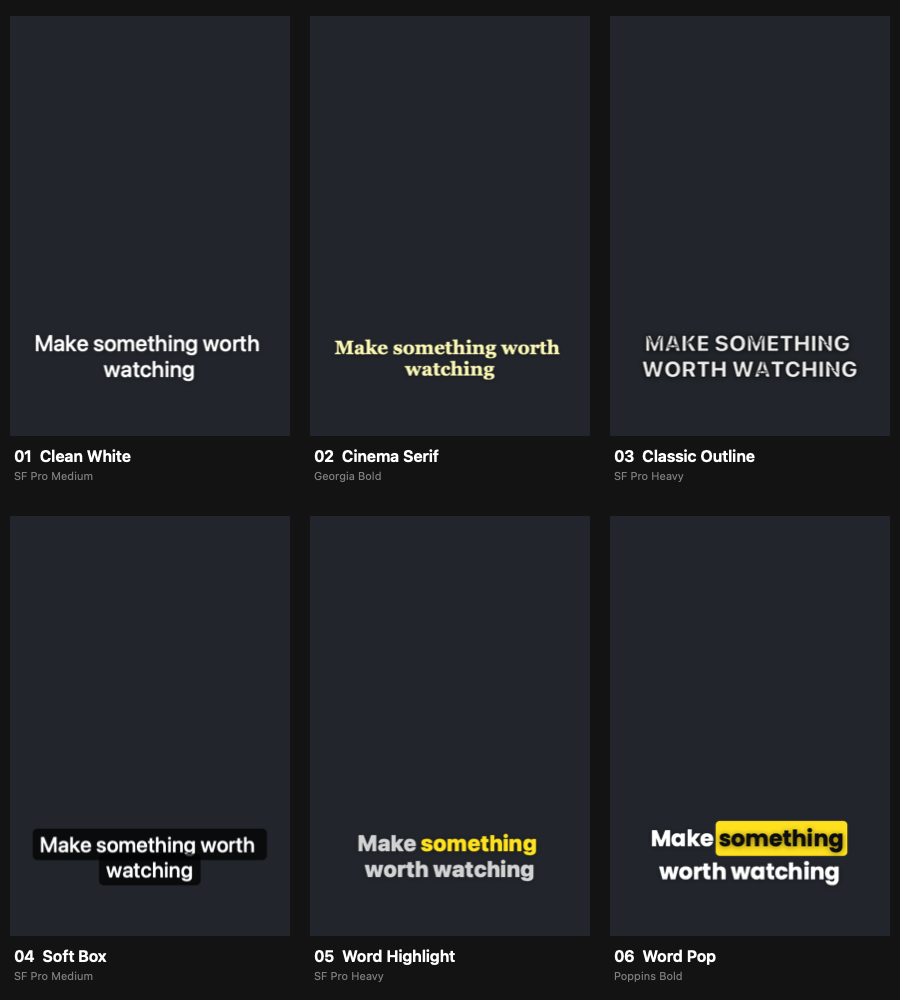
Transcribe a video, edit the words and choose from fifteen caption styles. The same text renderer draws the preview and the finished video.
Nine expressive designs. Poster Yellow, Soft Editorial, Playful Arc, Red Script, Lime Marker, Outdoor Outline, Red Impact, Acid Stack and Handmade White.
Six everyday essentials. Clean White, Cinema Serif, Classic Outline, Soft Box, Word Highlight and Word Pop.
Make the typography yours. Preview sample text in portrait or landscape. Customize font, layout, treatment, size, screen position, text width, letter spacing, line spacing, shadow and uppercase. Choose any text and accent color, or restore preset colors.
Words that arrive on time. Enable word-by-word animation for timed, eased reveals without shifting the caption layout. Preset changes preserve transcript edits and timings. Edited words use timing distributed within their caption.
An editable transcript. Choose the spoken language, transcribe, edit multiline captions and jump to their timecodes. Adjust words per caption from one to eight; changing this re-splits recognized words and discards text edits.
Video or SRT. Burn styled captions into a video, or export an SRT with text and timing. SRT does not carry the visual style.
Voice cleanup. Adjust noise reduction, clarity and compression, remove low rumble and choose a loudness target. Switch between original and cleaned audio after processing. Results depend on the recording.
04 / FRAMING & DELIVERY
Frame for the destination, compare every adjustment and export the main video with an optional portrait companion.
Choose your canvas. Keep the source format or choose 16:9, 9:16, 4:3, 1:1 or 4:5. Zoom, move the crop horizontally or vertically, and re-center.
Follow a face. Auto Reframe follows the largest detected face with adjustable movement speed. When no face is detected, the extra Reel uses a centered crop.
Compare without losing your place. Switch between the processed image, original and split comparison. Play or pause with Space, use B for original, S for split, and the arrow keys to step through frames. Loop playback when refining a moment.
Adjust the preview, keep export quality. Full, half and quarter preview resolutions balance detail and processing load. Export uses the full processing resolution.
Video formats. Choose H.264 or HEVC in MP4, or ProRes 422, 422 HQ or 4444 in MOV. H.264 and HEVC offer automatic bitrate or a manual 2–200 Mbps setting. Include or omit audio.
Size and frame rate. Keep the source resolution or choose 4K, 1440p, 1080p or 720p. Keep the source frame rate or choose 23.976, 24, 25, 29.97, 30, 50, 59.94 or 60 fps. The extra Reel is 1080 × 1920, with the main video’s duration, look and captions.
Still images, too. Open an image or export the current video frame as JPEG, PNG, HEIC or 16-bit TIFF. Keep original size or choose a 3840, 2560, 2048, 1920 or 1080-pixel long edge. JPEG and HEIC have quality controls.
A considered export workflow. Watch progress or cancel a render. If the additional Reel fails, the completed main export is kept. Export cannot overwrite the source video.
A Mac workspace that feels yours. Choose System, Light or Dark appearance, six accent colors or a custom color. Liquid Glass is available on macOS 26; Reduce Motion and Reduce Transparency are respected. Media Info keeps source details close at hand.
Lens profiles are creative approximations, not calibrated lens reproductions. Protect People uses a person mask rather than a full depth map. This release exports SDR; HDR sources are converted. LUTs use an SDR/sRGB pipeline.
Coming 27 November 2026
Apple silicon Mac · macOS 14 or later
€79.00 EUR
Full payment now. Digital delivery by 27 November 2026.
Applicable taxes are calculated at checkout.
This is a preorder. Your download is due by 27 November 2026 and is not available immediately at checkout. Delivery instructions will be sent to the email used for your order.
The full displayed price is charged at checkout. This is a one-time purchase, with no recurring subscription.
Email info@artlabs.io for preorder questions or cancellation requests. Please review the store policies before purchasing.
Contact ARTLABS · Refund policy