Four local engines
Choose SAM 2.1, RVM, BiRefNet Lite or Apple Vision for different foreground and matting workflows.

Your subject. Front and center.
Choose from four local segmentation and matting engines. Select subjects, refine alpha edges and export transparent footage. Your RotoBoy preorder includes RotoBoy Pro 1.0.
Coming 27 November 2026

Choose SAM 2.1, Robust Video Matting, BiRefNet Lite or Apple Vision. Guide the selection, review the result and refine the edge before exporting for your next composition.
Choose SAM 2.1, RVM, BiRefNet Lite or Apple Vision for different foreground and matting workflows.
Guide SAM with Include and Exclude points, then refine the matte with edge, alpha and frame-local brush controls.
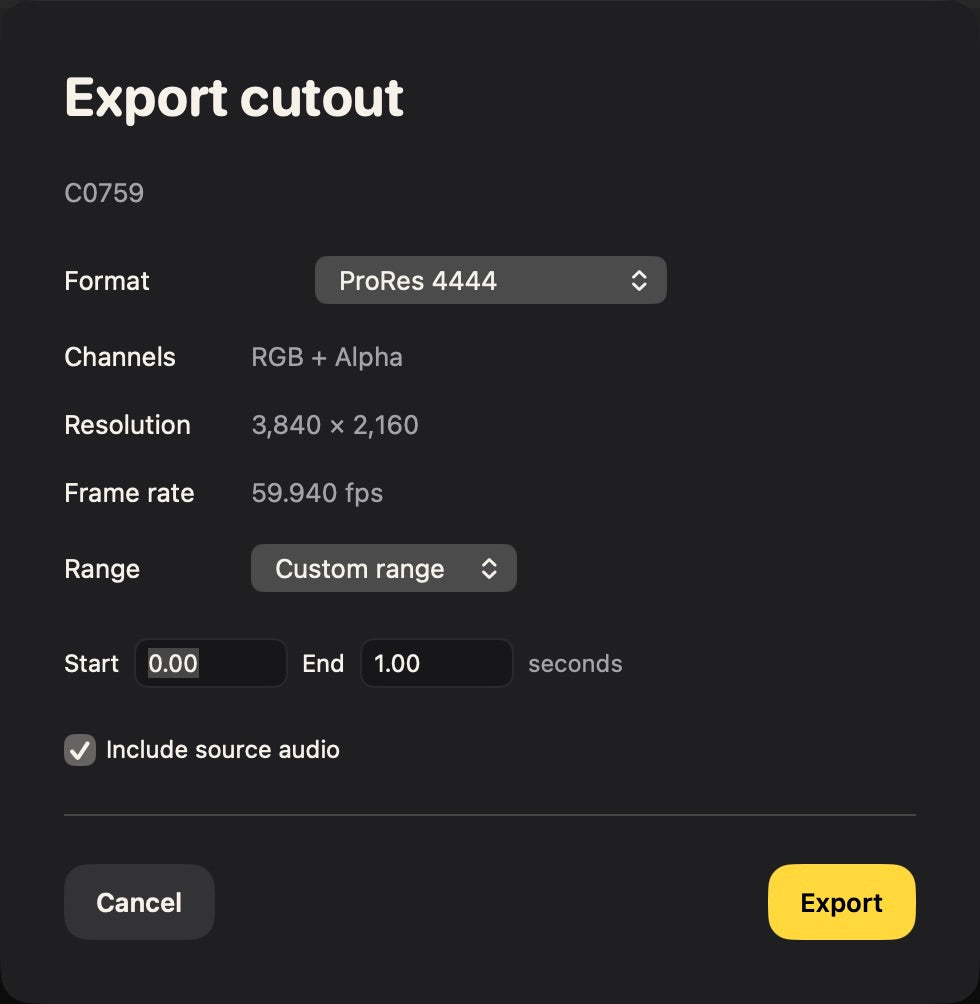
Export ProRes 4444 with alpha and optional source audio, transparent PNGs or grayscale matte sequences.
A closer look at the tools, controls and workflows included in RotoBoy Pro 1.0.
01 / FOUR ENGINES
RotoBoy Pro brings four local segmentation and matting engines into one Mac workspace. Choose an object, isolate a person or try automatic foreground separation.
SAM 2.1. Select objects with Include and Exclude points. Object memory carries your selection through the clip. Start with Tiny, or download Small and Base+ separately. SAM creates object masks; it is not a dedicated fine-hair alpha-matting model.
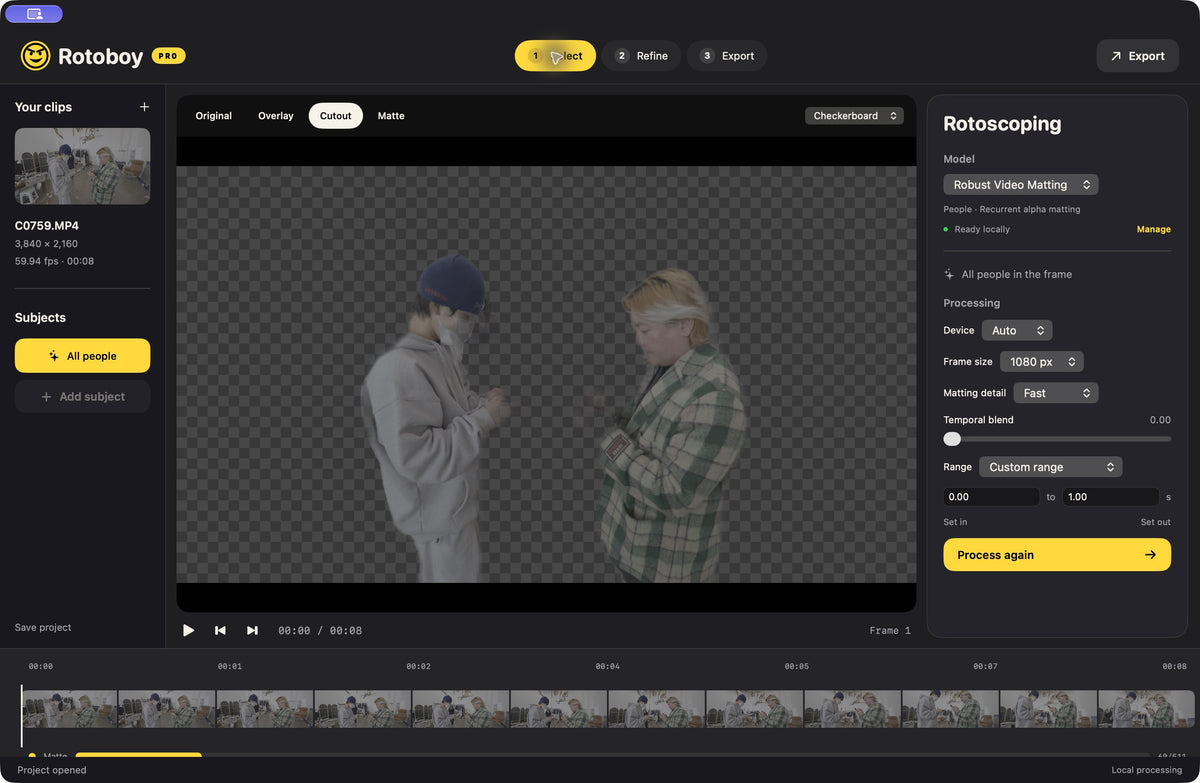
Robust Video Matting. Process people automatically with a recurrent model designed for soft alpha edges. This adapter handles people in the frame rather than individually selected objects.
BiRefNet Lite. Try automatic, detailed foreground segmentation. The Lite model processes each frame independently and has its own input-size control.
Apple Vision. Use the original foreground segmentation and object-tracking engine included with macOS, available without installing an external model.
Choose by footage. The best result depends on your subject and movement. Review hair, transparency, blur, occlusion and fast motion before exporting.
02 / POINTS & PROCESSING
Start with a quick single-frame preview. Add correction points across the clip, then process the whole shot or a chosen range.
Open or drop a video. Bring one source clip into the workspace and choose a model. For SAM, choose the model size as well.
Include and Exclude points. With SAM, place positive points on the subject and negative points on unwanted areas. Add Subject creates another object; select a subject’s name to edit its points.
Correction keyframes. Scrub to other frames and add points to correct the selection. SAM corrections affect the sequence when you process the range again.
Preview Selection. Process the current frame to inspect your prompts before committing to a longer range.
Process Range. Run over the clip or a chosen range. Keep a positive SAM point inside the range; Apple Vision requires its reference-selection frame inside it.
Resolution controls. Frame Size sets the longest side of input to external models. SAM uses its own 1024-pixel encoder, BiRefNet has a separate input size and RVM has a matting-detail control.
Temporal Blend. Mix adjacent output masks when useful. This is not motion compensation and may leave trails during fast movement. It starts at zero; SAM and RVM already maintain their own temporal state.
Review flagged frames. Flags identify empty or almost-full masks and uncertain Apple tracking. They are review hints, not a guarantee that every other frame is correct.
03 / EDGE & ALPHA
Inspect the cutout against different backgrounds, then refine the matte with precise edge and alpha controls.
Preview backgrounds. Switch between checkerboard, black, white, green and gray while reviewing Cutout and Matte views.
Softness and expansion. Soften the boundary and expand or contract it. Edge controls use source-pixel units; the preview scales adjustments to match full-resolution export.
Clean and shape the mask. Remove speckles, adjust alpha black and white points, change gamma or invert the mask.
Add and Remove brushes. Paint local corrections on the current frame. Undo its last brush stroke with Command-Z. Brush changes stay on that frame; they do not propagate.
Consistent processing. Changing a model or processing setting invalidates the previous tracked result so you do not accidentally export an old configuration. Per-frame brush corrections remain unless cleared.
Playback for inspection. Space plays or pauses a silent preview targeting roughly 15 fps.
04 / EXPORT & PROJECTS
Export a cutout for compositing and save the project so you can return to the decisions behind it.
Alpha video. Export ProRes 4444 with transparency and optional original source audio.
Image sequences. Choose transparent PNGs for the cutout or grayscale PNGs for the matte.
Frame timing. Export samples the source nominal frame rate, capped at 120 fps. Variable-frame-rate media is sampled onto that frame grid.
Automatic and named saves. Projects save automatically. Save Project As creates a named .rotoboy document. Footage and mask caches are referenced rather than embedded, so keep the original video available.
Bring older projects forward. Pro can read standard RotoBoy version 1 projects, although masks may need regeneration. Pro saves version 2 documents, which the standard app cannot open.
Keyboard shortcuts. Command-O imports, Command-Shift-O opens a project, Command-S saves, Command-Shift-S saves as, Command-Shift-M opens Models and Command-E exports.
Know the scope. Exports use SDR. HDR finishing, foreground color decontamination, spline rotoscoping and multi-clip timelines are not included in this release.
05 / LOCAL MODELS
Download the optional engines once, verify their installation and process footage locally. Model files are separate from the app download.
Choose your downloads. Open Models to download an individual engine or Install All Three. The first setup prepares the local runtime. Large model weights are not bundled inside the app.
A genuine readiness check. Each model must pass an inference test before it is marked Ready. Verify Installation checks the runtime and tests installed models.
Automatic, Metal or CPU. Auto uses Metal when available and follows the verified CPU fallback when needed. You can also choose CPU or Metal explicitly.
No cloud footage processing. Setup requires internet access to download the models and runtime. Once installed, inference runs locally without uploading your footage. Normal use does not require Xcode, Homebrew, an API key or a cloud account.
Storage kept separate. Projects and model downloads have separate local storage. Keep enough space for models, source footage and mask caches.
Optional AI engines require model and runtime downloads. Inference then runs locally. Brush corrections are frame-local; SAM point corrections propagate when reprocessed. Exports use SDR. Review difficult hair, motion blur, transparency and occlusion.
Coming 27 November 2026
Apple silicon Mac · macOS 14 or later
€59.00 EUR
Full payment now. Digital delivery by 27 November 2026.
Applicable taxes are calculated at checkout.
This is a preorder. Your download is due by 27 November 2026 and is not available immediately at checkout. Delivery instructions will be sent to the email used for your order.
The full displayed price is charged at checkout. This is a one-time purchase, with no recurring subscription.
Email info@artlabs.io for preorder questions or cancellation requests. Please review the store policies before purchasing.
Contact ARTLABS · Refund policy