Time, in your words
Type a duration or a finish time, drag the slider, and keep the current running or paused state.

A little less noise. A little more focus.
A compact menu-bar timer with focus rhythms, a local daily journal and small details to discover. Your STILL preorder includes STILL V2.
Coming 27 November 2026

Set time with a slider or natural language. Move between Timer and Pomodoro, watch your sessions take shape and keep a quiet record of the focus you have given yourself.
Type a duration or a finish time, drag the slider, and keep the current running or paused state.
Choose Classic, Gentle, Deep Focus or custom intervals, with one to eight sessions and a local daily reflection.
Discover tactile slider stops, quiet musical tomatoes, a breathing circle and motion that respects your preferences.
A closer look at the tools, controls and workflows included in STILL V2 · 2.0.1.
01 / THE TIMER
STILL V2 is a compact menu-bar timer with native glass controls. Set a duration, begin, and let the panel disappear while you focus.
A compact native panel. The timer fits into a 320 × 190-point panel. Click the menu-bar tomato and countdown to open or close it; click outside to dismiss.
A slider that follows your intention. Drag to change the remaining time immediately. A running timer stays running and a paused timer stays paused. The usual 1–60-minute range expands for longer intervals.
Natural duration entry. Click the digits and type 25, 1h 20m, 1.5h or 1:20. You can also enter until 3:30 or until 15:30, with AM or PM supported. The result must be between 1 and 180 minutes.
Finish at a time. A clock time without AM or PM uses the next matching occurrence. The duration is calculated when you enter it and keeps the timer’s running or paused state.
Safe corrections. Return commits a duration; Escape cancels. Invalid input leaves the current timer intact and shows an inline hint. A successful entry settles into place with a small animation and click.
One main control. The circular button starts, pauses, resumes or silences the alarm. Hover over the countdown to see its finishing time without moving the digits.
Quick menu actions. Right-click the menu-bar item for 5-, 15- and 30-minute choices, timer actions, Settings and Quit.
Timekeeping beyond the panel. A wall-clock deadline keeps the countdown going while the panel is closed. A sleeping Mac cannot play an alarm; waking within its five-minute alarm window plays the remaining window only.
02 / POMODORO
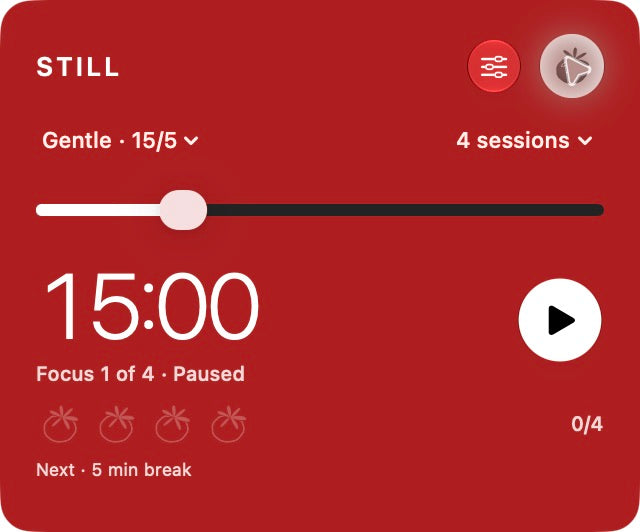
Switch between one countdown and a focus-and-break routine. The tomato at the top changes modes while preserving the current countdown.
Three rhythms and your own. Choose Classic, Gentle, Deep Focus or custom focus and break durations.
A set that fits the day. Choose one to eight focus sessions, short breaks between them and a longer break after the final focus session.
A tomato for completed focus. Each completed focus session earns one tomato. Pausing, editing and resetting do not earn credit. A new set clears its row of tomatoes while keeping the daily journal.
You choose when to continue. Stop the alarm and press Play to start the next interval. The panel shows your progress through the set.
Progress in the menu bar. The tomato fills red as focus advances and stays ripe during a break. Pausing freezes its progress; changing the duration starts a new interval’s progress.
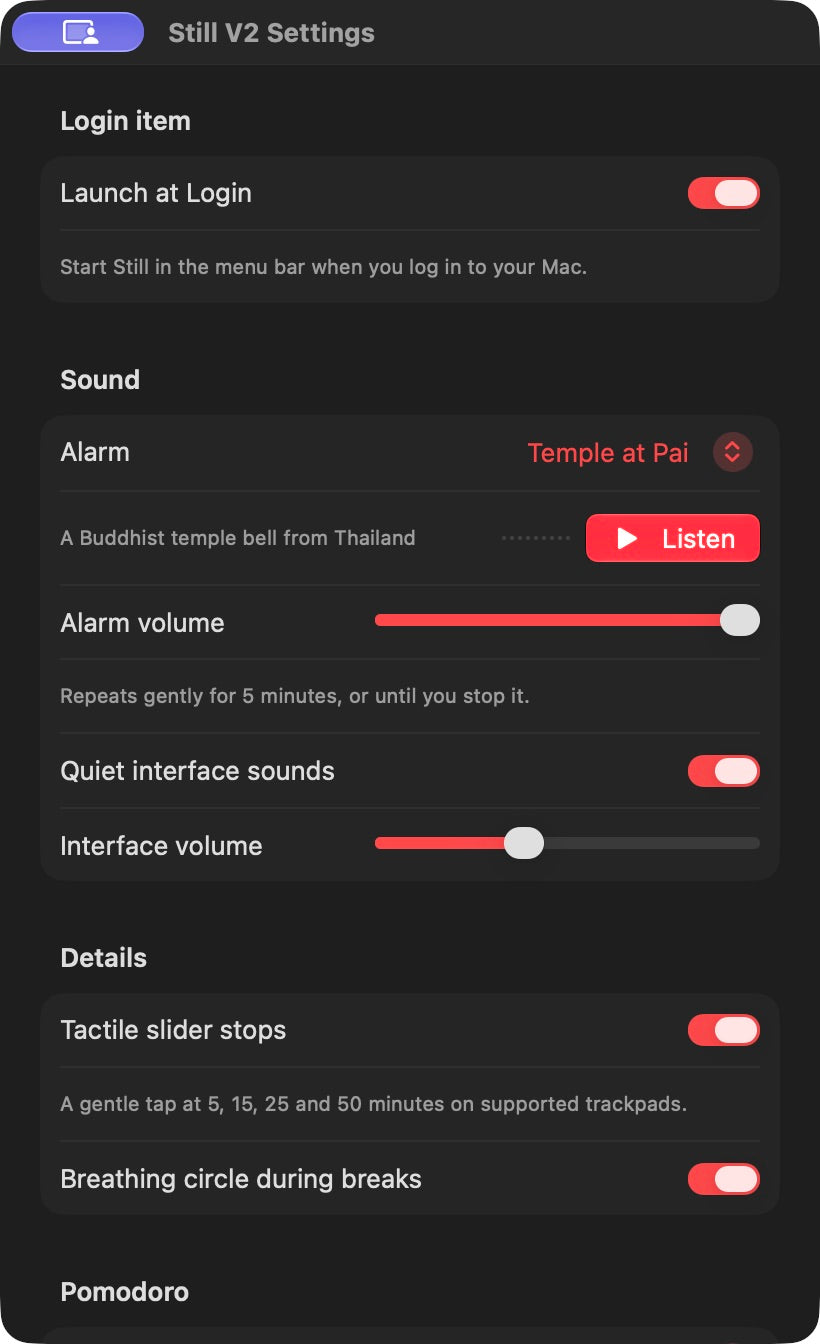
A breathing moment. An optional thin circle expands and contracts around the time during a running break. It stops when paused or when the panel closes, and can be disabled in Settings.
A quiet daily reflection. Hover over session tomatoes to see completed sessions and focused minutes. The local journal groups sessions by calendar day, excludes pauses and includes active time before a duration adjustment. There are no scores or streaks.
History that stays local. Journal entries are saved locally and deduplicated. The journal begins with sessions completed in V2; earlier releases did not store daily history. Completion is recorded at the deadline even if the Mac sleeps.
03 / SOUND & FEEL
Sound, motion and touch provide quiet feedback. Alarm volume and interface volume have separate controls, and optional cues can be silenced.
Alarm choices. The current preview includes Deep Meditation, Temple at Pai, Ether Chime, Sea Chime and Bamboo Garden. Listen previews the selected sound. The alarm repeats with quiet gaps for up to five minutes unless stopped sooner.
Sound you can see. A small waveform follows the actual sound preview, including its natural decay, and stops when playback stops.
A gentle ending. Stopping the alarm fades the bell over 320 milliseconds with a contracting ring. Repeats stop immediately. A new alarm or preview cancels the previous fade safely.
Nine slider ticks. Short, preloaded ticks subtly change pitch with the duration. Fast drags drop excess clicks instead of queuing a burst.
Tactile landmarks. On a supported trackpad, feel a small alignment tap at 5, 15, 25 and 50 minutes. Toggle tactile slider stops independently in Settings.
Start, pause and resume. Each action has a distinct paired tone from the same musical family. Quiet Interface Sounds and Interface Volume control these cues.
A final-minute glow. The digits gain a faint, steady glow during the last minute of a running timer. There is no flashing.
One ripple at the bell. A quiet ripple crosses the panel when the alarm first rings; repeating the alarm does not repeat it.
Native motion, considered. The panel expands gently from the menu-bar tomato. Opening and mode changes are brief. Reduce Motion is respected, and transient effects stop when the panel closes.
04 / PLAYFUL DETAILS
The small things are there to discover. They never change your earned focus sessions or interrupt the countdown.
A living little tomato. Hover near the header tomato and its leaves lean toward the pointer, then spring back. After eight seconds paused with the panel open, it relaxes its leaves and closes its eyes. Hover or resume to wake it.
A note for every session. Each earned tomato plays a different soft pentatonic note. Up to four notes can resonate together; outlined tomatoes remain quiet until earned.
Squish, smash, recover. Tap an earned tomato five times quickly for a soft plop and six fading droplets. It reforms automatically. Slow taps play notes instead, and your completed session credit stays intact.
Pluck a leaf. Drag the top of an earned tomato to stretch its leaves, then release for a small spring and muted pluck. VoiceOver also offers Pluck Leaf and Smash Tomato actions.
A small celebration. Completed tomatoes have slightly different leaf angles. Finishing the last focus session briefly gathers them with a soft chord before they settle back into place. Alarm repeats do not replay the chord.
Touch the glass. Tap an empty patch of the panel for a faint indentation and a quiet tone that varies across its surface. Buttons and the slider retain their normal actions.
An enso, just for a moment. Hold STILL to draw a circle with a delicate brush sound. The heading returns automatically, and the action is accessible without a pointer. Reopening the panel does not replay the discovery.
Quiet is always an option. The new interactions use 28 original synthesized cues. Turning off Quiet Interface Sounds silences notes already playing. Decorative motion respects Reduce Motion and does not run continuously.
05 / EVERYDAY MAC DETAILS
Choose the appearance and feedback you prefer, then keep the timer close without filling your workspace.
Appearance and controls. Native translucent material and Liquid Glass controls form a compact panel. Pomodoro uses a red surface with white text. The menu-bar countdown keeps its system text color.
Launch at Login. Keep the app in Applications and enable native login registration in Settings. A login launch leaves the panel closed. If macOS needs approval, Settings links to Login Items.
Familiar shortcuts. Space starts, pauses or resumes when you are not typing. Return commits a duration. Escape cancels entry, stops an alarm or closes the panel. Command-comma opens Settings and Command-Q quits.
Your previous timer comes with you. Existing V1 saved timers, alarm choice, sound volume and appearance remain compatible. Check Launch at Login after updating the renamed app.
Designed to stay focused. STILL is a timer and focus companion. It does not block apps or websites. Requires Apple silicon and macOS 26 or later.
Requires Apple silicon and macOS 26 or later. A sleeping Mac cannot sound an alarm. The daily journal starts with V2 sessions. STILL does not block apps or websites. App previews show the development build.
Coming 27 November 2026
Apple silicon Mac · macOS 26 or later
€19.00 EUR
Full payment now. Digital delivery by 27 November 2026.
Applicable taxes are calculated at checkout.
This is a preorder. Your download is due by 27 November 2026 and is not available immediately at checkout. Delivery instructions will be sent to the email used for your order.
The full displayed price is charged at checkout. This is a one-time purchase, with no recurring subscription.
Email info@artlabs.io for preorder questions or cancellation requests. Please review the store policies before purchasing.
Contact ARTLABS · Refund policy